
Take Maker — Shorten sleeves, pants & skirts in Unity (No Blender · NDMF)
Description du produit
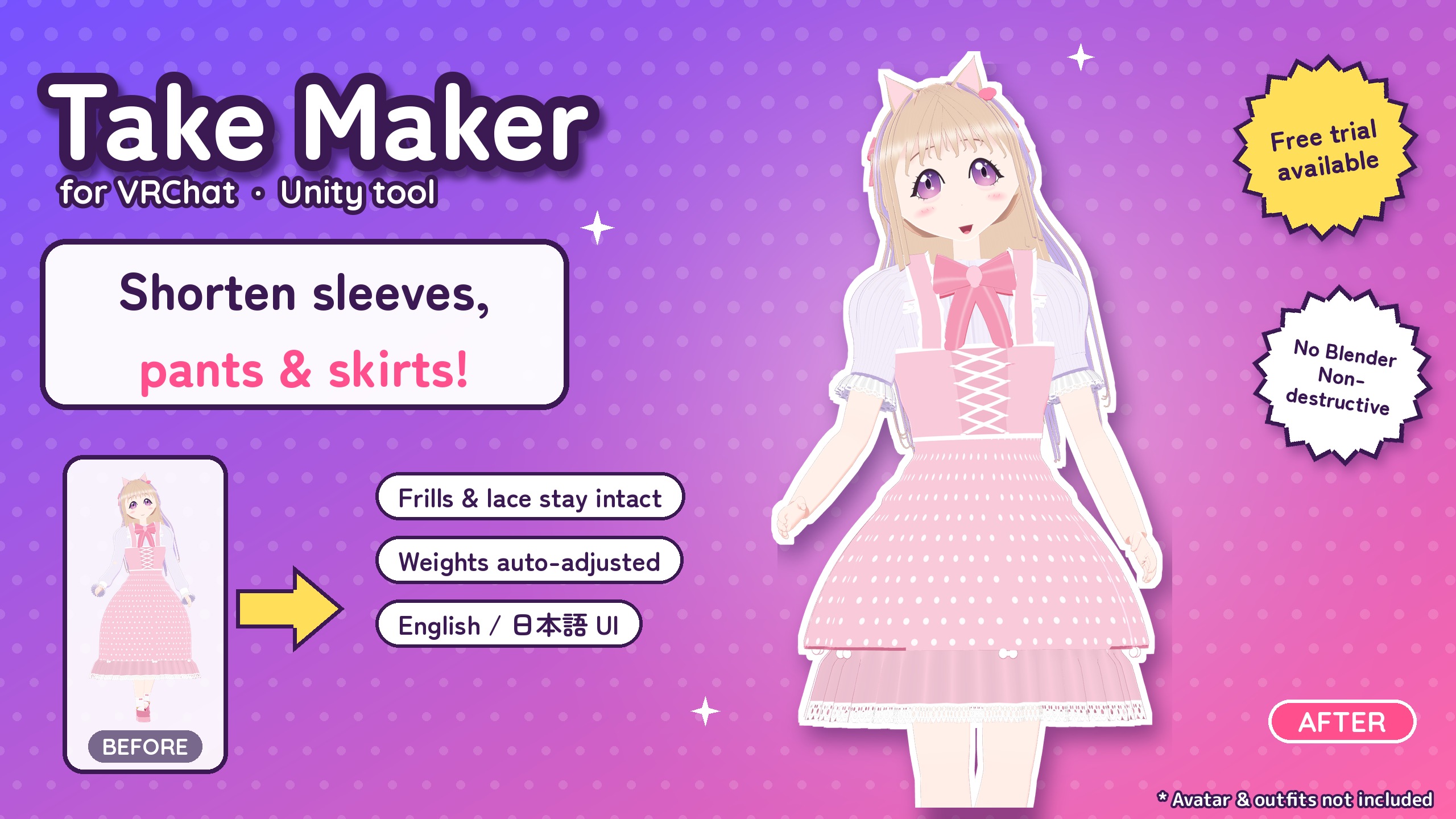
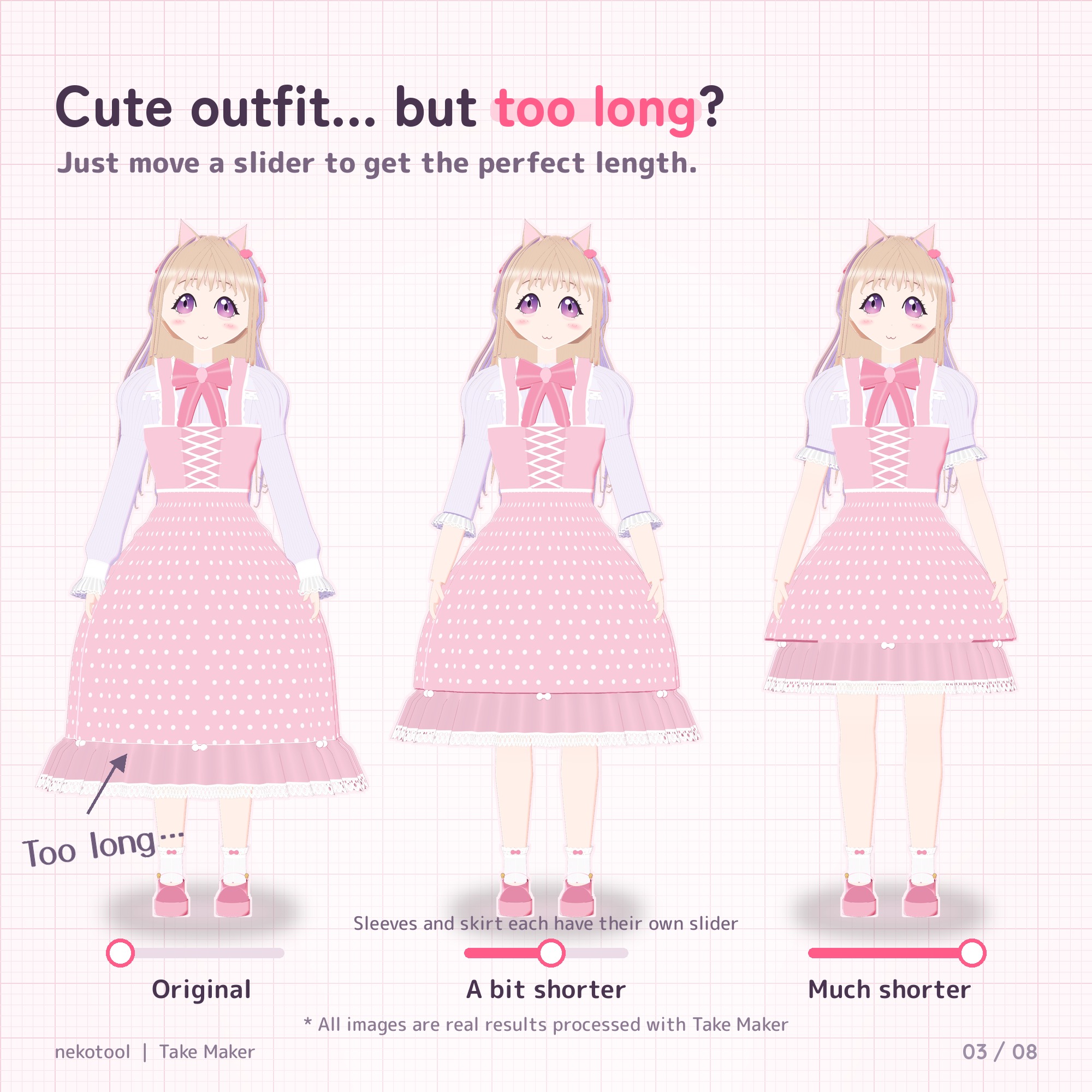
Love the outfit, but the sleeves or skirt are too long?
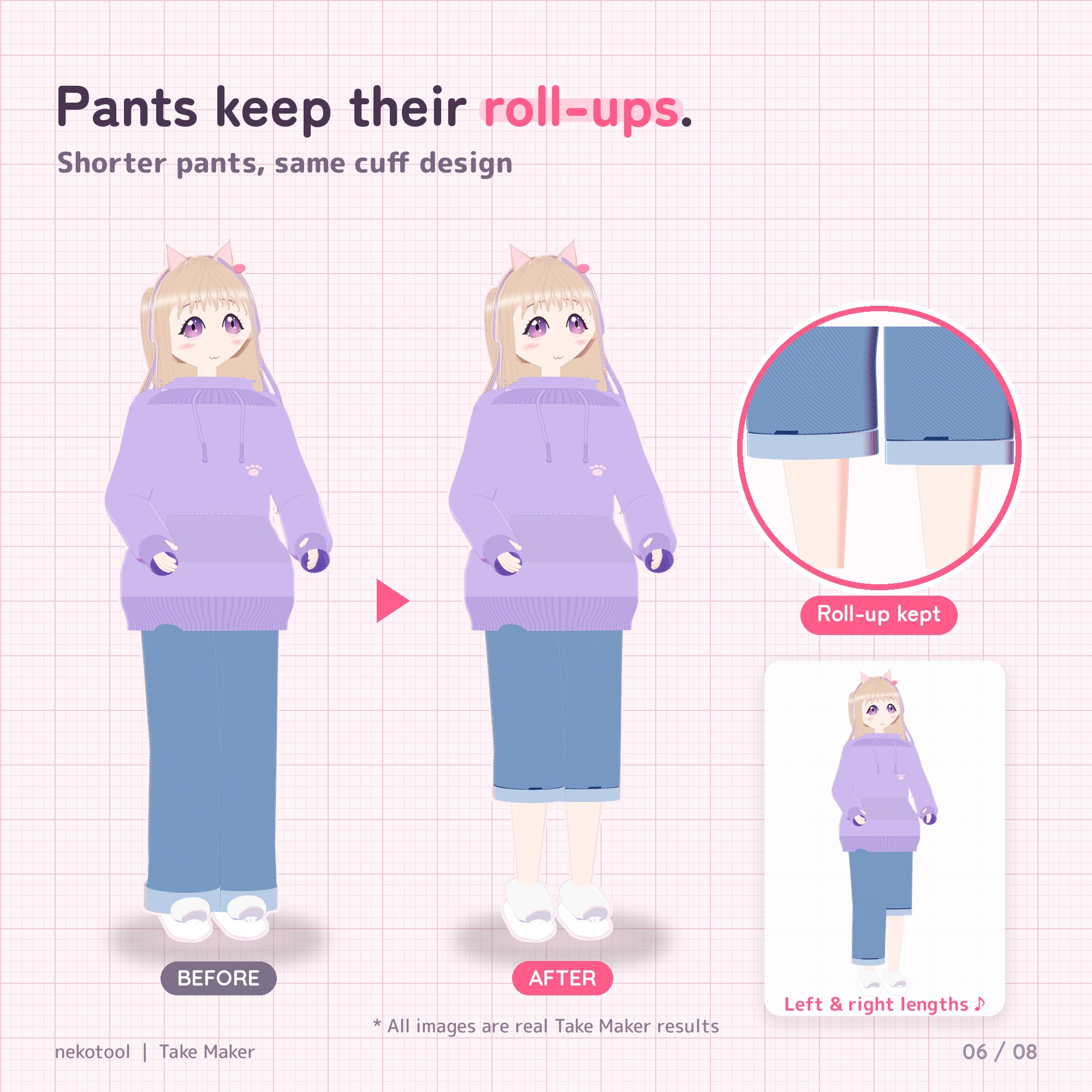
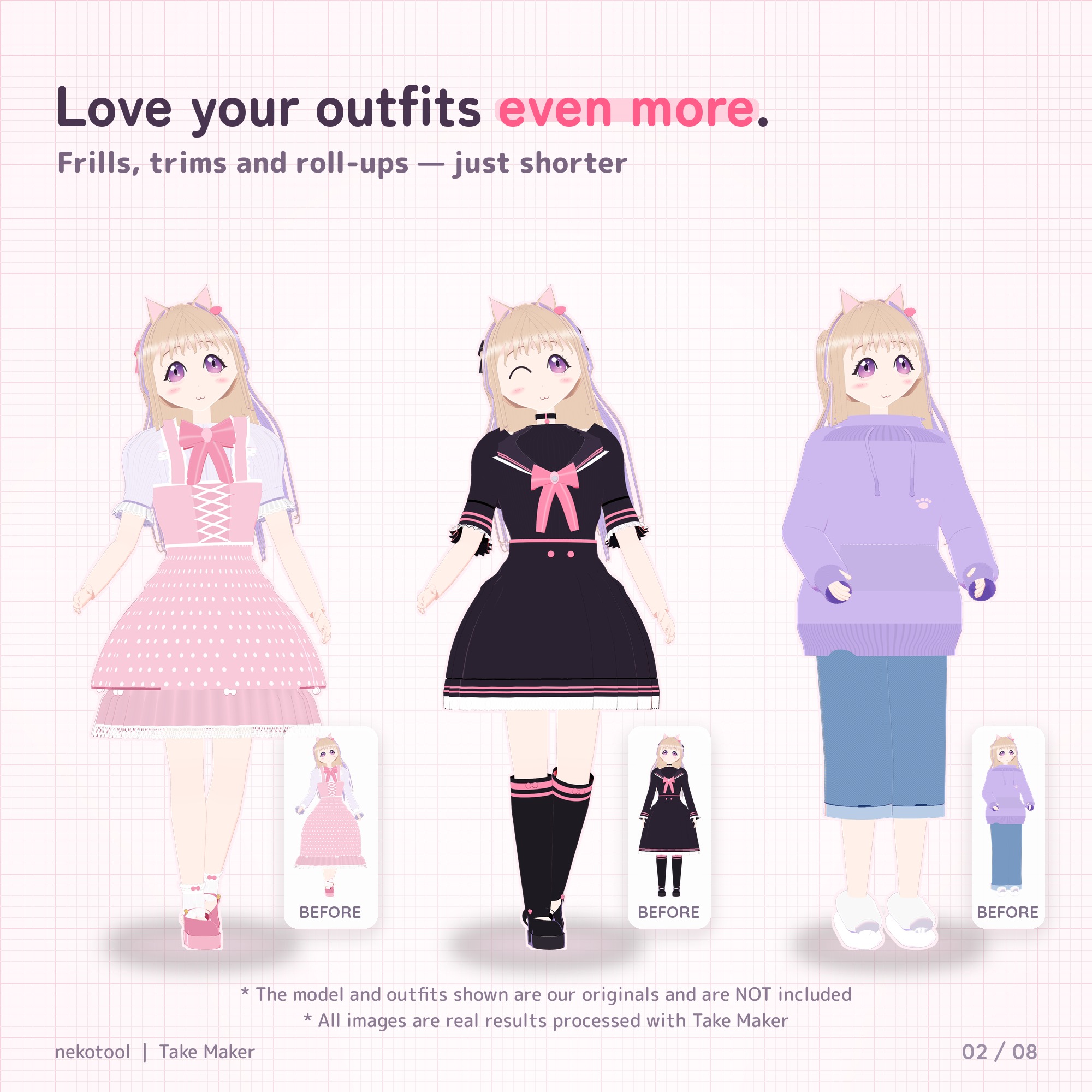
Take Maker shortens sleeves (L/R), pants (L/R) and skirts right inside Unity. Just move a slider. No Blender, no mesh-editing skills needed.
Launch price: $5.99 USD until Nov 30, 2026, 11:59 PM JST (6:59 AM PST / 14:59 UTC). After that, the regular price is $7.99 USD. Prices are in USD; your card provider converts to your local currency, and any applicable tax is shown at checkout.
Not sure it fits your outfit? Try the free trial on your own avatar first.
Features
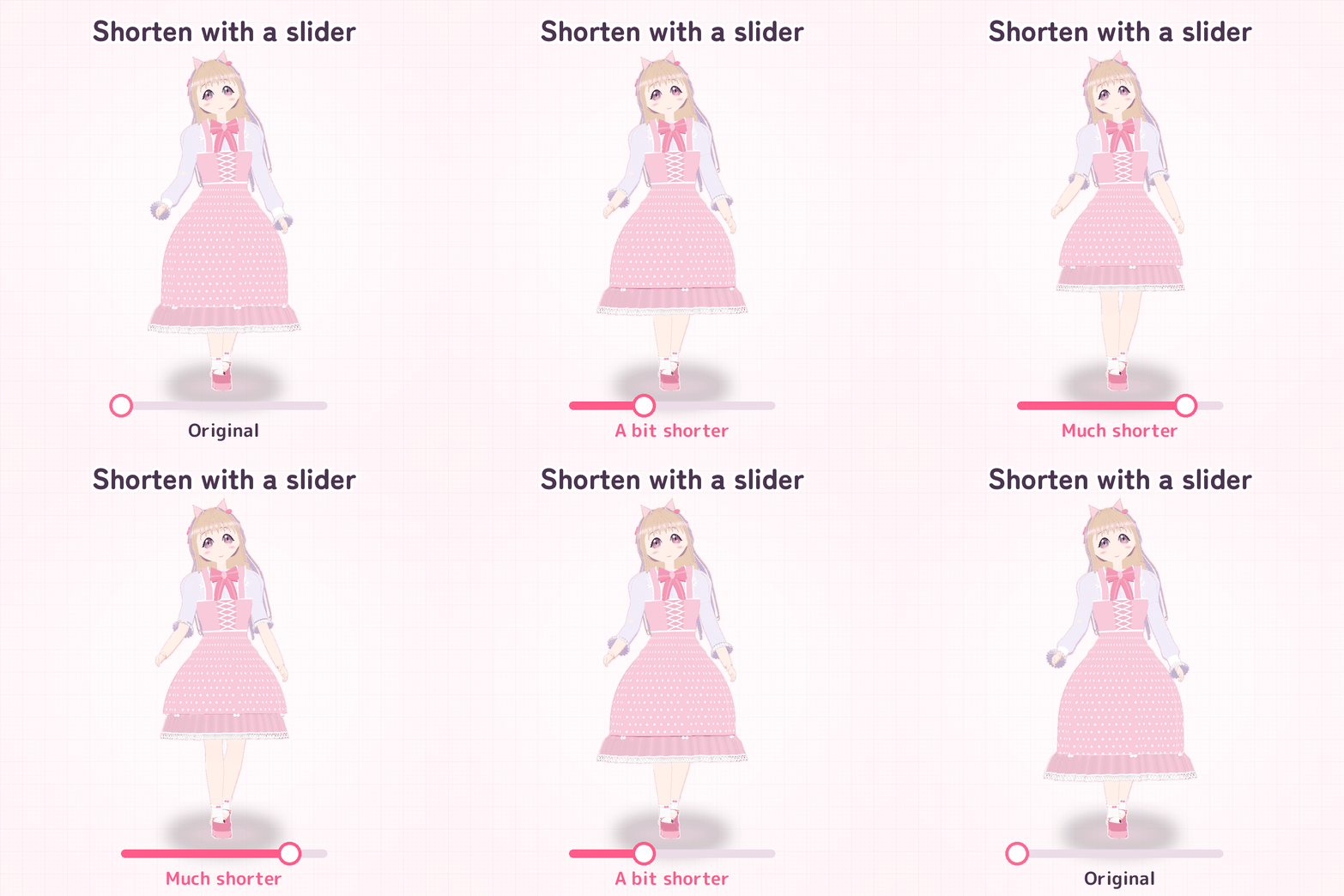
- Shorten with sliders. "Detect parts" finds sleeves, pants and skirts automatically. Then just move the slider.
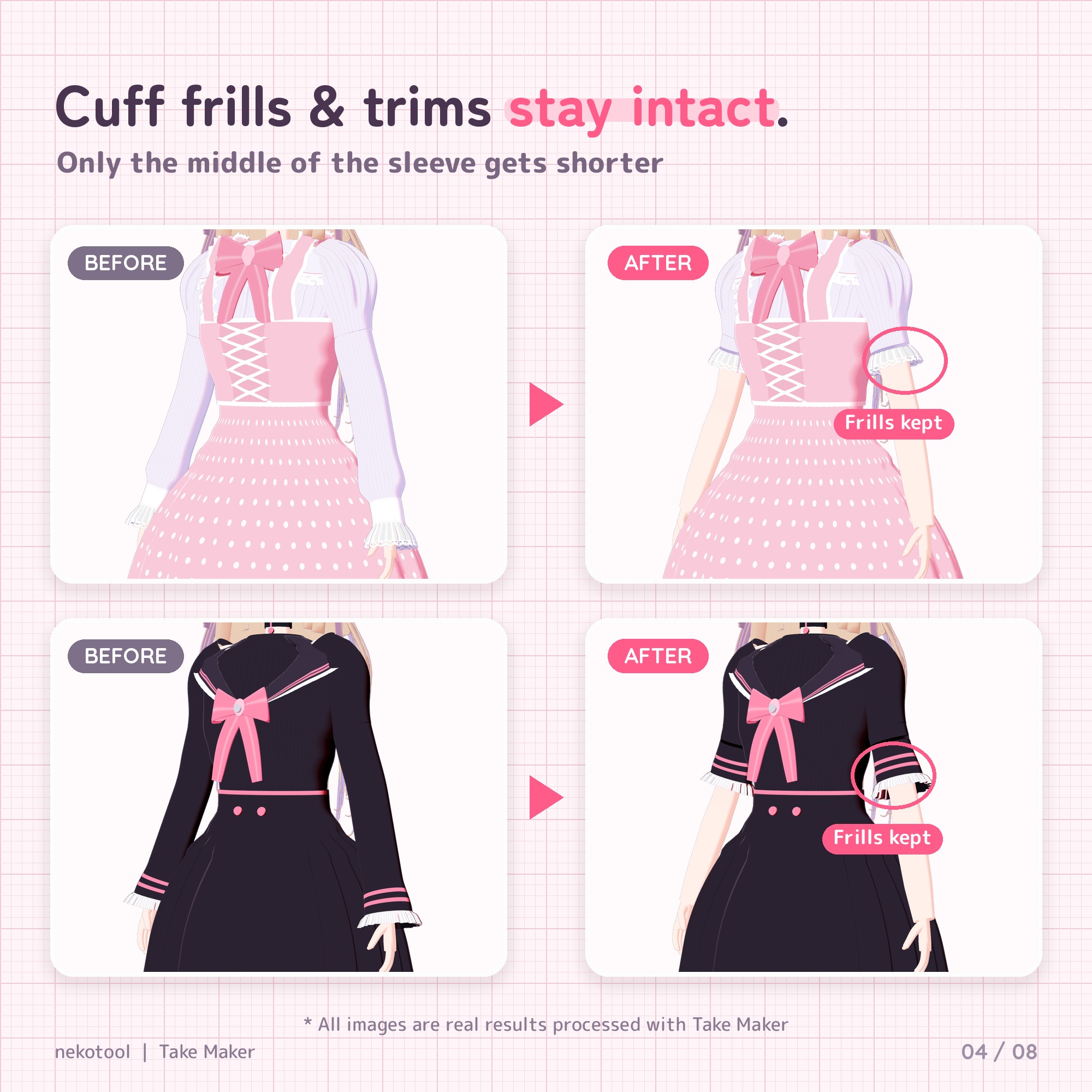
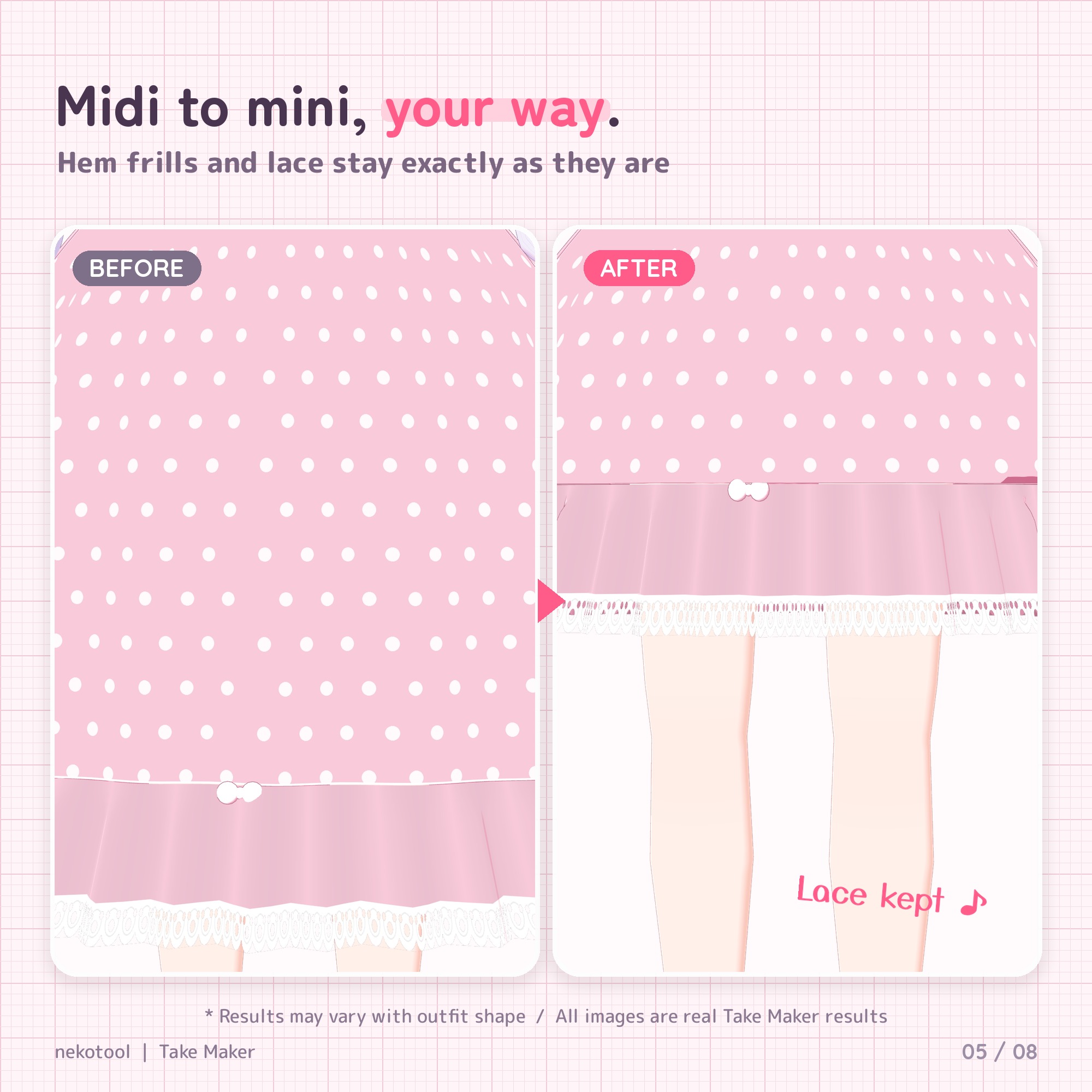
- Hem details stay intact. Cuffs, ribbing, frills, lace and trims keep their shape; only the fabric above the hem gets shorter. Works with slanted hems, tiered and pleated skirts.
- Non-destructive. Your outfit's FBX, materials and prefabs are never changed. The length is applied at upload (NDMF), and Take Maker removes itself from the avatar. Delete the component to get the original length back.
- Bone weights adjusted automatically (Bake mode), so the new hem follows naturally when elbows and knees bend.
- Hidden skin revealed automatically. Skin hidden by body shape keys (xxx_OFF / Shrink_xxx) is shown only where it becomes visible.
- Linings and inner layers too. Lining, petticoat and outline meshes of the same outfit are shortened by the same amount.
- Fewer clipping issues. The hem is widened slightly to fit over the body and inner layers.
- Result check. Lists anything to watch out for (missing body skin, hem too close to the arm or leg, and so on).
- Optional in-game toggle. "Toggle in game" mode adds a shape key and an Expression menu toggle (Modular Avatar) to switch between short and original length. Uses 1 synced bit per outfit.
- English / 日本語 Inspector, switchable with one click.
How to use (3 steps)
Before you start: add Modular Avatar to your project with VCC or ALCOM (NDMF comes with it).
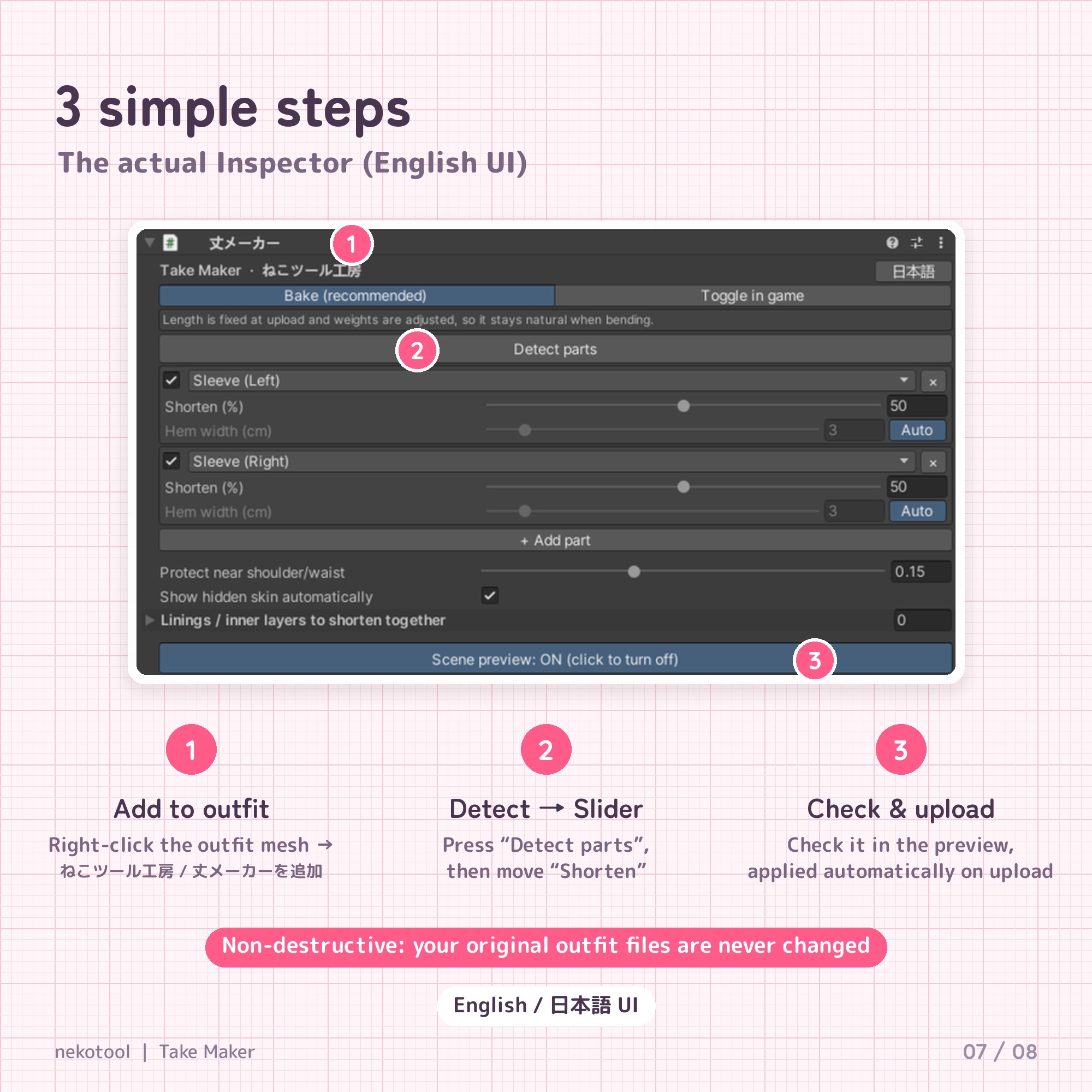
- Right-click the outfit mesh (the object with the SkinnedMeshRenderer) → ねこツール工房 / 丈メーカーを追加 ("Add Take Maker"; the menu name is in Japanese).
- Click Detect parts, turn on Scene preview and move the Shorten slider (30–60% is a good start). Notes to watch out for appear in the Inspector while previewing.
- Turn the preview off and click Check result for a final check, then upload as usual.
Requirements
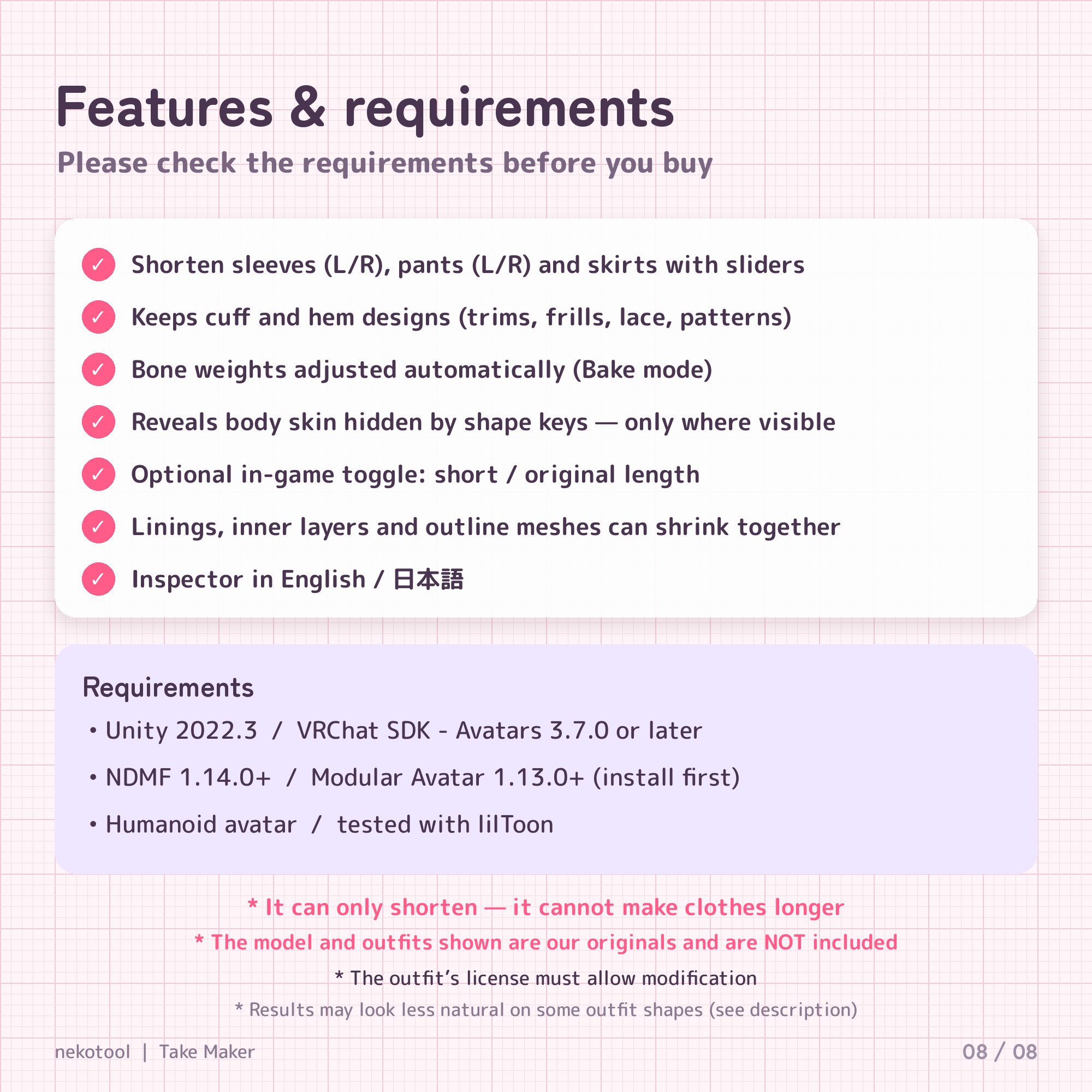
- Unity 2022.3 (VRChat's recommended version)
- VRChat SDK - Avatars 3.7.0 or later
- NDMF 1.14.0 or later
- Modular Avatar 1.13.0 or later
- Humanoid avatar
- Any shader (Take Maker edits the mesh itself; tested with lilToon)
What's included
- TakeMaker_v1.0.0.unitypackage (drag & drop into Unity)
- README_EN.txt and TERMS_OF_USE_EN.txt (plus the Japanese originals)
The Jinxxy download has no VCC local package, so skip README section "B. VCC local package".
Please note
- It only shortens. It cannot make clothes longer.
- The Inspector is fully in English, but a few result-check and warning messages are still in Japanese. English versions are planned for a free update.
- Designed for outfits whose sleeves, pants and skirts follow the arms, legs and waist (uniforms, hoodies, shirts, pleated or flared skirts, dresses, balloon pants). Very wide bell sleeves, many layered petticoats and capes may look less natural; check the preview and use a smaller amount.
- In "Toggle in game" mode, bone weights aren't changed, so shortening a lot across the elbow or knee can distort when bending. Bake mode is recommended.
- Bodies with the skin under the outfit deleted (lightweight versions) have no skin where the outfit was shortened. Use a body with all skin intact (e.g. xxx_Full).
- The outfit's own license must allow modification.
- The model and outfits in the images are our own originals made for demonstration and are not included.
- Results can't be guaranteed for every avatar and outfit. Please try the free trial first and back up your project.
Refunds
Digital download, so no refunds for change of mind. Please try the free trial first. If Take Maker doesn't work as described and we can't fix it with an update within 14 days of your report, we'll give you a full refund. This doesn't affect your rights under consumer law or Jinxxy's Customer Protection.
Terms (summary)
- Personal and commercial use, on any number of computers.
- Avatars and outfits shortened with Take Maker can be uploaded, streamed, shown and used for commission work. Credit is optional.
- Not allowed: redistributing, reselling or sharing the tool (or modified versions or its code).
- Edited outfits stay subject to the original outfit's terms.
Full terms are at the bottom of this page and in TERMS_OF_USE_EN.txt.
Updates and support
Updates are free and appear in your Jinxxy inventory. Questions before or after buying: email [email protected]. For bug reports, please include the avatar and outfit names, the Shorten % you used, and a screenshot.
v1.0.0 (Oct 28, 2026): first release.
Also from nekotool: Photo Mode: 20 poses, face lock, eye contact and a group 3-2-1 countdown for VRChat photos (PC/Quest/mobile, free trial available).
Made by nekotool (ねこツール工房) · News: X @nekotool_kobo · Also on BOOTH and Gumroad
Full terms of use
The bundled terms file will be updated to match this page in v1.0.1. Until then, if they differ, the terms on this page apply.
Take Maker (丈メーカー) - Terms of Use
These are the terms of use for "Take Maker (丈メーカー)" (the "Tool"), including its free trial, sold by nekotool (ねこツール工房) (the "Author"). By purchasing, downloading or using the Tool, you agree to these terms.
1. Permitted use
- The person who purchased or downloaded the Tool may use it for personal and commercial purposes on any number of computers.
- Avatars and outfits whose length was changed with the Tool may be uploaded to VRChat and other platforms, streamed, shown in videos and images, and used for commissioned editing work. Credit is optional.
2. Prohibited
- Redistributing, reselling, transferring or sharing all or part of the Tool (source code, packages, manuals), free or paid
- Distributing or selling modified versions of the Tool, or anything that reuses its code
- Distributing data of other creators' outfits or avatars edited with the Tool in violation of the original creators' terms (edited data remains subject to the terms of the original outfit or avatar)
- Use for purposes that violate laws, public order or VRChat's terms
3. Modification
- You may modify the source code for your own personal use (distributing modified versions is prohibited).
4. Disclaimer
- Except for intentional misconduct or gross negligence, the Author's liability for any damage caused by using the Tool is limited to the amount you paid or USD 7.99, whichever is greater (USD 7.99 for the free trial).
- The Tool is designed not to change your original outfit files, but backing up your project before use is recommended.
- Operation with every outfit and avatar is not guaranteed.
- Nothing in these terms limits rights you have under applicable consumer law.
5. Updates and support
- Bug fixes and updates are free to download for purchasers from the store where you bought the Tool (BOOTH / Gumroad / Jinxxy).
- Support is provided as far as possible: BOOTH messages for BOOTH purchases; for Gumroad and Jinxxy, email [email protected] (Gumroad buyers may also reply to their receipt).
- If these terms change, the change is announced on the product page and the new terms are included with the new version. A change never retroactively narrows the permitted use of anyone who bought before the change.
6. Refunds
- As a digital download, there are no refunds for change of mind. Please try the free trial first.
- If the Tool doesn't work as described and an update can't fix it within 14 days of your report, you'll get a full refund. This doesn't affect any refund the store grants under its own policy.
7. Language and governing law
- The Japanese version (利用規約.txt) is the original. For purchases on BOOTH the Japanese terms (JPY amounts) apply; for purchases on Gumroad / Jinxxy these English terms (USD amounts) apply.
- These terms are governed by the laws of Japan.
(c) 2026 nekotool (ねこツール工房). All rights reserved.